Quit doomscrolling.
Keep your apps.
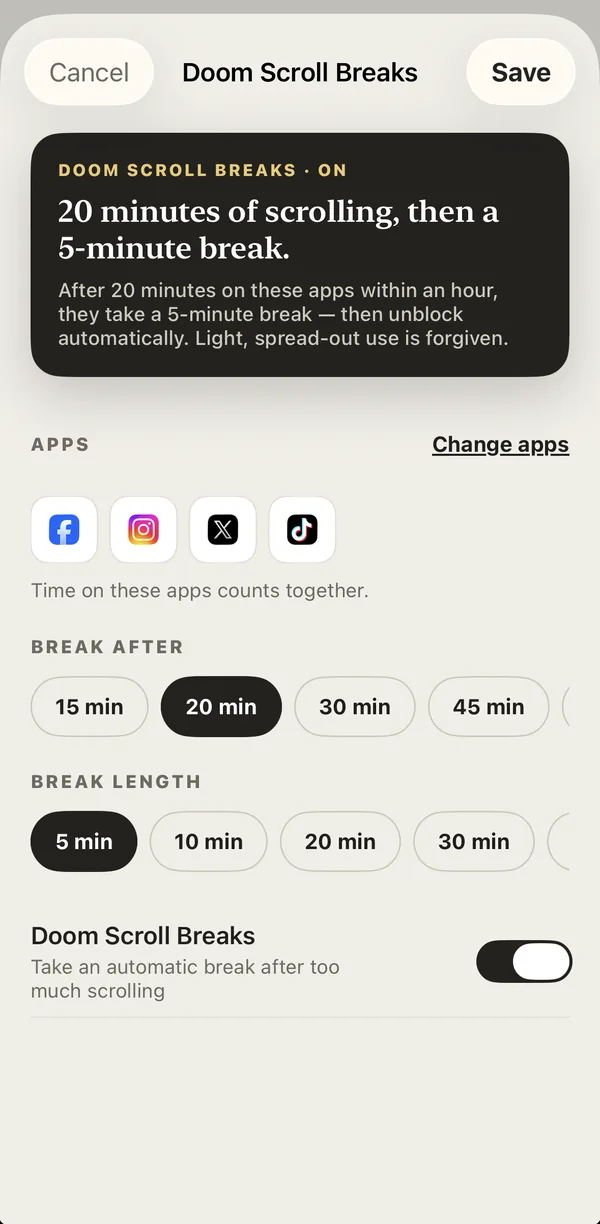
YourPriority lets you scroll for a while. Then your scrolling apps take a short break, and you see your top priority instead of the feed. When the break ends, the apps open again by themselves.
No account · No ads · iOS 17 and macOS 14 or later
The feed never ends.
So you don't stop.
Infinite feeds and autoplay are built to keep you watching. In preliminary findings in February 2026, the European Commission said TikTok's own time tools were "easy to dismiss". Willpower alone is not enough.
Each video is short, so it never feels like a big decision. But the minutes become hours.
Apple's limits are easy to skip for adults. Two taps, and you're back in the app.
Blocking everything feels too strict when you still need the app for friends, news or work.
Scroll for a while. Take a short break. Repeat.
Pick the apps you scroll most.
Time on all of them counts together, so you can't just move from Instagram to TikTok.
Choose your numbers.
How long you can scroll (15 to 60 minutes), and how long the break is (5 to 60 minutes).
The break comes by itself.
Your apps lock, your top priority appears, and when the break ends, everything opens again.
YourPriority counts your scrolling within a window three times as long as your limit. With a 20-minute limit, that's 20 minutes within an hour. Light, spread-out use is forgiven, so a quick check in the morning doesn't cause a break in the evening.
A break, not a ban.
Many blockers either lock an app for hours or make you wait a few seconds before it opens. Doom Scroll Breaks are between these two: you can still use your apps, but a long session can't take your whole evening.
- Works on the apps you choose. Instagram, TikTok, YouTube, X, Facebook or any app you can pick in Screen Time.
- No Ignore button. The break screen only has Review Priorities and Go back.
- Settings can't end a break early. If you change them during a break, the new settings start after it ends.
- Built on Apple's Screen Time. Your app use stays on your iPhone.
How a short break compares with a limit you can skip.
| Screen Time limit | Full-day block | Doom Scroll Breaks | |
|---|---|---|---|
| Can you still use the app? | Yes, until your daily total is used | No, not during the block | Yes, in sessions you choose |
| When your time is up | "Ignore Limit" lets you continue with two taps | Locked for hours | A short break, 5 to 60 minutes |
| What you see | Apple's "Time Limit" screen | A "blocked" message | Your top priority for today |
| After the break | You wait until tomorrow | You wait until the block ends | Your apps open again by themselves |
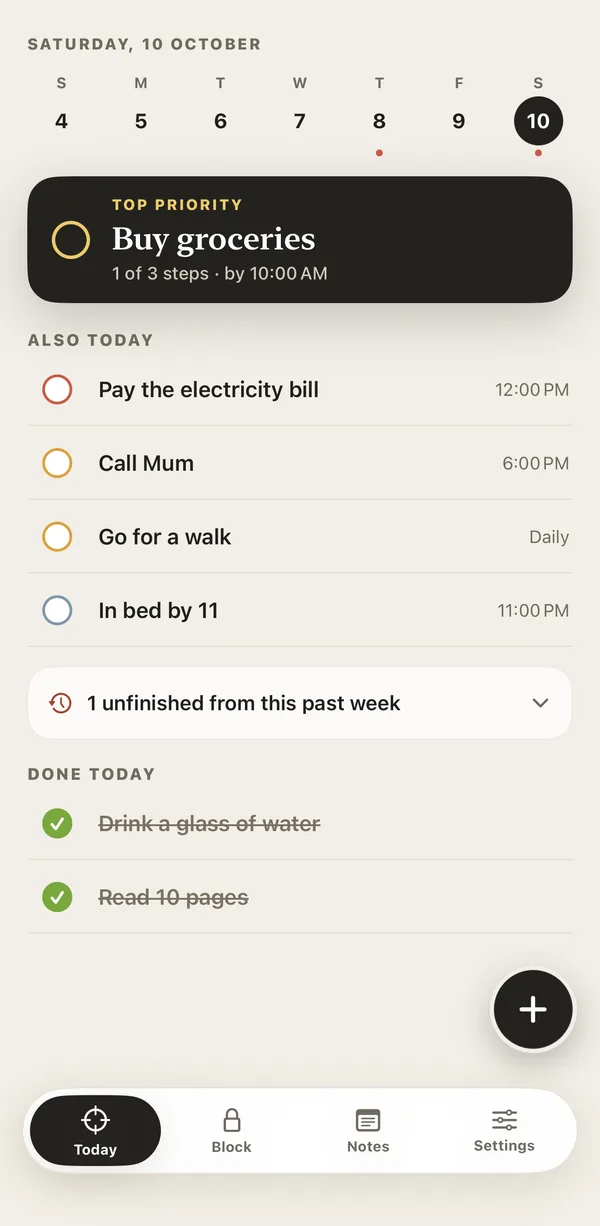
Your top priority, where the feed was.
Stopping is easier when you know what to do next. YourPriority has a simple to-do list with your most important task on top. When a break starts, that task is the first thing you see. Tap Review Priorities to open your list.
- One task on top. Your top priority, then everything else under "Also today".
- Planning reminders. A morning and evening reminder to choose today's priority and plan tomorrow's.
- Steps and reminders. Break a big task into small steps, and get reminded on time.
More ways to stop scrolling. All free.
- Blocks on your scheduleLock any app all day, at certain hours, or after a daily limit, on the days you choose.
- One urgent break a day10 minutes when you really need a blocked app, after a 15-second pause.
- A pause before you remove a blockRemoving or loosening a block makes you wait 20 seconds first, and 40 seconds the second time that day.
- Websites on MacDoom Scroll Breaks and blocks for websites in Safari, Chrome, Arc, Brave and Edge, with no extension.
- No account, no ads, no trackingDownload it and start. Nothing to sign up for.
- Pro only adds syncEverything above is free. Pro ($4.99 a month or $29.99 a year) syncs your to-dos and notes between iPhone and Mac.
I was spending almost 6 to 8 hours a day on my phone. Screen Time limits were very easy to skip, and the blocker apps I tried were basically just blocking apps. I wanted my phone to show me my priorities instead. So I built YourPriority.
Tanjil, founder of YourPriority · Read my story
Guides to quitting doomscrolling.
-
Doomscrolling
Why Can't I Stop Doomscrolling? (And What Actually Helps)
Why it's so hard to stop scrolling, even when it makes you feel worse: endless feeds, autoplay, bad news and habit. What the research says, and what actually helps.
-
Doomscrolling
What to Do Instead of Doomscrolling: 30 Ideas That Take 5 Minutes
30 simple things to do instead of doomscrolling, for when you're tired, bored, stressed, at work, in the morning or at night, and how to make the new habit last.
-
Doomscrolling
How to Stop Doomscrolling in the Morning (and Start the Day With Your Plans)
Why it's so hard not to check your phone when you wake up, what the research really says, and 7 steps to stop doomscrolling in the morning on iPhone.
-
Doomscrolling
Is Doomscrolling Bad for You? What It Does to Your Mood, Sleep and Focus
What research says about doomscrolling and anxiety, sleep, attention, brain fog and "brain rot", what it doesn't show, and how quickly things can improve when you scroll less.
-
Doomscrolling
How to Stop Doomscrolling at Night: A Simple 7-Step Plan
Why you scroll in bed, what it does to your sleep, and a 7-step plan to stop doomscrolling at night on iPhone, including free settings and apps.
-

How-to
How to Block Instagram on iPhone (and Stop Reels Without Deleting It)
You can't block only Reels on iPhone, but you can stop endless Reels without deleting Instagram. Free ways to block or limit Instagram on iOS 26 and iOS 27.
Questions about doomscrolling and Doom Scroll Breaks.
What is a Doom Scroll Break?
A Doom Scroll Break is a short, automatic break from the apps you scroll most. In YourPriority, you pick the apps and how long you can scroll (15 to 60 minutes). When you reach that time, those apps lock for a break of 5 to 60 minutes, then open again by themselves.
Is there an app that stops doomscrolling?
Yes. Some apps make you wait before an app opens, like one sec and ScreenZen. Some lock apps on a schedule, like Opal or Apple's Screen Time. ScreenZen also has a cooldown after you use an app. YourPriority lets you scroll normally, then gives your chosen apps a short automatic break and shows your top priority instead of the feed, on iPhone and Mac. It's free. For an honest comparison, read The Best Free App Blockers for iPhone.
Can I skip a Doom Scroll Break?
The break screen has no Ignore button, only Review Priorities and Go back. If you change your Doom Scroll Breaks settings during a break, the new settings start after that break ends.
Which apps can Doom Scroll Breaks work with?
On iPhone, any app you can choose in Screen Time, such as Instagram, TikTok, YouTube, X or Facebook. Time on all the apps you pick counts together. On Mac, YourPriority works with websites in Safari, Google Chrome, Arc, Brave and Microsoft Edge.
Can it block only Reels or Shorts?
No. YourPriority can't block one part of another app, so Doom Scroll Breaks work on the whole app. That still stops long Reels and Shorts sessions. Read more in How to Block Instagram on iPhone.
Is YourPriority free?
Yes. Doom Scroll Breaks, app blocks, urgent breaks, the to-do list and notes are free. Pro, at $4.99 a month or $29.99 a year, only adds iCloud Sync between iPhone and Mac. There's no account.
Let the feed wait.
Download YourPriority free. Turn on Doom Scroll Breaks, and enjoy your evenings again.